


AI OFFICE
VORA DOCS (WORKS) — AI Office
Documents, presentations, spreadsheets and Korean documents. Use VORA WORD, SLIDE, CELL and HWP on the web and desktop, and connect VORA AI to work with your own knowledge.
Four tools for your document workflow
Choose the editor suited to your document and turn ideas into finished work.
- VORA WORD — Documents and reports · DOCX, DOC, ODT
- VORA SLIDE — Presentations · PPTX
- VORA CELL — Spreadsheets and data analysis · XLSX, CSV
- VORA HWP — Korean documents and official forms · HWP, HWPX
Start in your browser, continue on your desktop
Start on the web without installation, or use an app for macOS, Windows or Linux. General document editing is free for individuals; enterprise adoption is available by inquiry.
Document work connected to your knowledge
A free VORA.IM account or authentication with an existing account enables AI features and export to VORA in desktop apps. Connect your materials and AI settings while keeping general document editing independently available.
Beyond document generation: a complete office suite
The comparison centers on the gap between generating documents and delivering a complete office suite. VORA DOCS brings WORD, SLIDE, CELL and HWP together with document quality, file compatibility and hands-on editing after generation, overcoming the limitations of conventional generative document tools.
VORA AI DOCS
Office platform comparison
A free integrated office suite with Hyper RAG, collaborating AI agents and advanced spreadsheets. Connect document generation, hands-on editing and workflow automation.
Scroll horizontally to compare all platforms.
| Feature | VORA AI DOCS | Hancom Docs | Microsoft 365 |
|---|---|---|---|
| Core file formats | Integrated HWP, HWPX, DOCX, XLSX and PPTX support | HWP and HWPX focus, with Microsoft Office file compatibility | DOCX, XLSX and PPTX focus; limited direct HWP editing |
| Basic editing | Free basic personal editing in WORD, SLIDE, CELL and HWP | Free basic web editing; desktop and AI features depend on the plan | Free basic web editing; desktop and advanced features depend on the plan |
| AI approach | Collaboration across multiple AI agents and workflow automation | Hancom Docs AI for document, text and image generation and editing | Copilot for document generation and analysis, with agent extensions |
| Hyper RAG integration | Native integration of vector search, keyword search, ontologies and knowledge graphs | An integration equivalent to VORA Hyper RAG is not confirmed in public documentation | Microsoft Graph search, connectors and RAG extensions |
| Knowledge use | Search and analyze internal documents and external information for document generation and editing | Document-focused generation, editing and summarization | Search and analysis across Microsoft 365 and connected external sources |
| Excel functions | Standard Excel functions | Core spreadsheet functions | Standard Excel functions |
| Solver | Supported | Web version support requires confirmation | Solver add-in in desktop Excel |
| VBA macros | Same VBA support on web and desktop | Excel VBA compatibility requires confirmation | Supported on desktop; no VBA creation, execution or editing on the web |
| Workflow automation | Multiple AI agents plus VBA and macro automation | AI-assisted document drafting, editing and summarization | Copilot, Office Scripts and VBA |
| HWP documents | Integrated HWP/HWPX editing, document templates, AI form filling and On-nara shortcuts | Document environment centered on HWP and HWPX | Limited native HWP/HWPX editing |
| Key strength | Free integrated office suite + Hyper RAG + multiple AI agents + advanced Excel features + VBA | Korean document workflows in public administration and education | Global office standards and enterprise productivity ecosystem |
Comparison as of November 2026 distinguishes basic editing from AI and desktop features. Availability varies by product version and plan.
Four strengths of VORA AI DOCS
- 01
Native Hyper RAG integration
Combine vector search, keyword search, ontologies and knowledge graphs to find and analyze internal documents and external information, then use the results directly in document generation and editing.
- 02
Advanced, Excel-compatible spreadsheets
Use standard Excel functions and Solver, with the same VBA macro support on the web and desktop. Build on existing Excel workflows and automation assets, from analysis to repetitive tasks.
- 03
Collaboration across AI agents
Go beyond generation and summaries. Multiple AI agents work together on knowledge retrieval, data analysis, report writing and document editing.
- 04
Free office editing across HWP and Microsoft formats
Free basic personal editing in WORD, SLIDE, CELL and HWP brings Korean HWP workflows and global Microsoft Office formats together in a complete office suite.
VORA HWP · RUST + WEBASSEMBLY
Document templates and AI form filling with VORA HWP
Work with a variety of document templates and let AI fill in form fields. Familiar shortcuts from Korea’s On-nara government document system, a Rust-based engine and WebAssembly on the web bring security and performance to everyday editing.
- AI forms
Document templates and automatic form filling
Use a variety of document templates and let AI help fill in their fields automatically. Reduce repetitive form entry, then review and edit the completed content to finish your document.
- On-nara
The same keyboard shortcuts
Use familiar On-nara document shortcuts in VORA HWP to carry your editing habits into a new workspace.
- Rust
Memory safety and efficient processing
The Rust-based engine strengthens memory safety and provides efficient performance for document processing and editing.
- WebAssembly
Fast, sandboxed execution on the web
The web version runs on WebAssembly (WASM), combining fast execution with the browser’s sandbox and permission policies to strengthen document performance and security.
VORA DOCS introduction
VORA SLIDE and Claude comparison
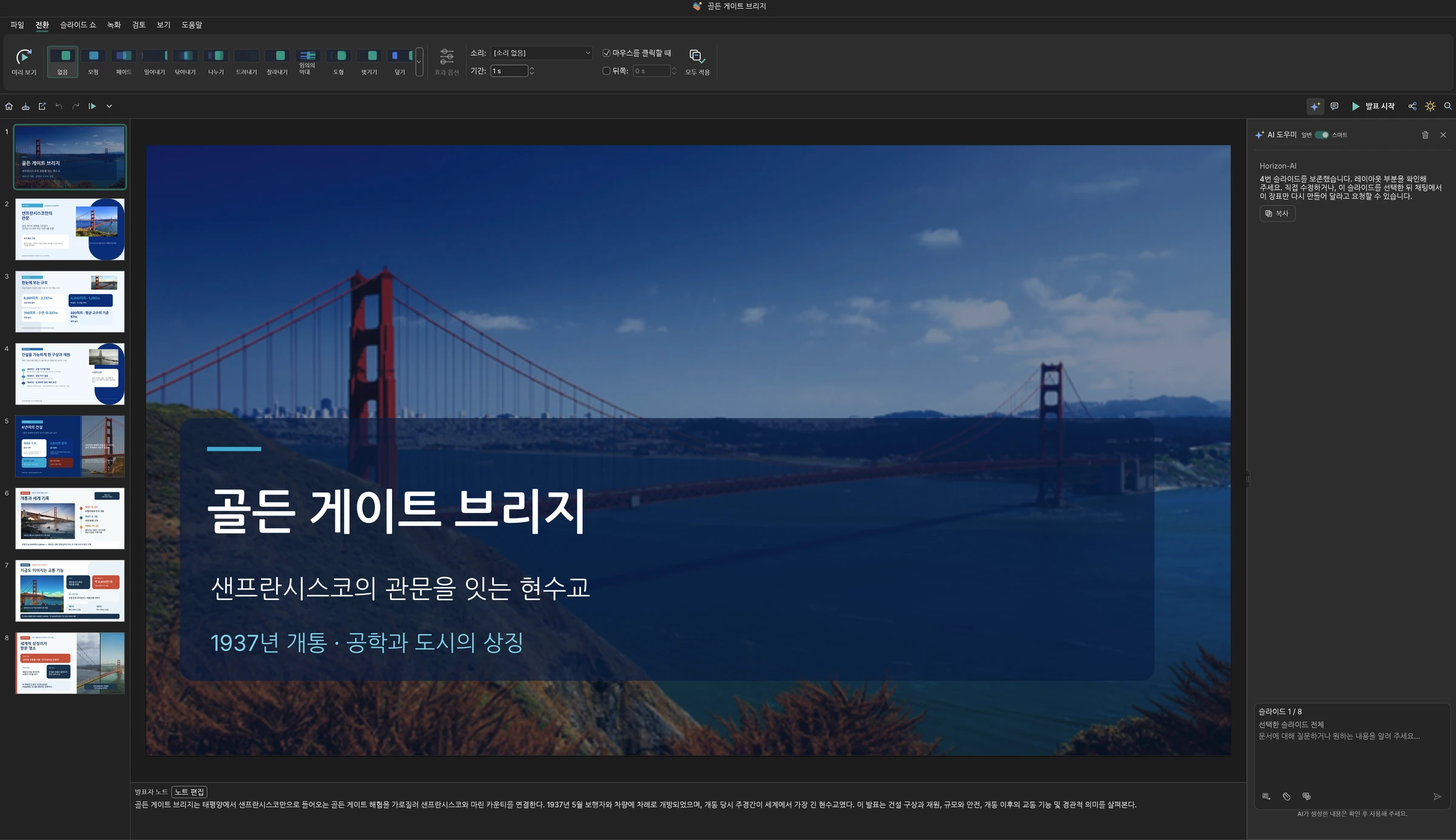
2 imagesVORA SLIDE — The complete VORA DOCS office suite
VORA DOCS is a complete office suite with WORD, SLIDE, CELL and HWP. VORA SLIDE is its presentation application, combining document quality, office-file compatibility and hands-on editing after generation. Users can refine the content, images, shapes and layouts of AI-generated presentations to turn generated output into finished work documents.
Claude — Relative limitations as an office suite
In this product comparison, Claude can generate presentations but falls short as an integrated office suite against VORA SLIDE’s combination of document quality, file compatibility and hands-on editing after generation. The key distinction is between receiving a generated file and having an office environment to edit and finish work documents. VORA DOCS moves beyond that limitation as a complete office suite.
Solution
- VORA HYPER RAGLinkbricks Horizon AI has officially launched VORA HYPER RAG, an enterprise-grade integrated AI…
- AI CONVERSATIONAL HUMAN 2.0As artificial intelligence plays an increasingly critical role in both everyday life and busines…
- BUSINESS INTELLIGENCE 2.0As the first company in Asia authorized by Sisense—the global leader in Business Intelligence (B…